Building a Dynamic Facebook Feeds Carousel in SitecoreAI with Next.js
Monday, August 10, 2026
Summary
Social media content is one of the most effective ways to keep website experiences fresh and engaging. Recently, I implemented a reusable Facebook Feeds component that integrates Facebook posts into a SitecoreAI + Next.js solution, giving content authors complete control over which pages to display while automatically pulling the latest Facebook content.
In this post, I'll walk through the architecture, implementation approach, and key features of the solution built using FacebookFeeds.tsx and FacebookFeeds-sitecore.tsx. The former is the React presentation component, while the latter serves as the Sitecore wrapper responsible for data integration and authoring support.
To learn more about this architectural separation and its benefits, please refer to my previous post on building a Reusable Hero Banner component.
Solution Overview
The solution is divided into three logical layers:
Presentation Component - A reusable React component responsible for rendering the UI.
Sitecore Integration Layer - A server component that retrieves Sitecore data, fetches Facebook posts, and transforms the data into the presentation model.
Sitecore Content Configuration - A rendering item backed by a GraphQL query that allows content authors to configure Facebook pages, titles, and the number of posts to display.
This separation keeps the presentation layer independent from Sitecore-specific logic, making the UI component reusable and easier to test.
Sitecore GraphQL Query
The rendering retrieves its datasource using the following GraphQL query:
query getFacebookFeedsData($datasource: String!, $language: String!) {
        facebookFeedsData: item(path: $datasource, language: $language) {
        ... on FacebookFeeds {
            facebookFeeds: field(name: "FacebookFeeds") {
                jsonValue
                }
                title: field(name: "Title") {
                    jsonValue
                }
                subTitle: field(name: "Subtitle") {
                    jsonValue
                }
                totalSlidesToShow: field(name: "TotalFeedsToShow") {
                    jsonValue
                   }
                  }
                }
              }
The datasource exposes four configurable fields:
FacebookFeeds - A multilist of Facebook feed configuration items.
Title - Section heading.
Subtitle - Supporting description.
TotalFeedsToShow - A multilist of Facebook feed configuration items.
This approach allows marketers to configure the component without modifying code.
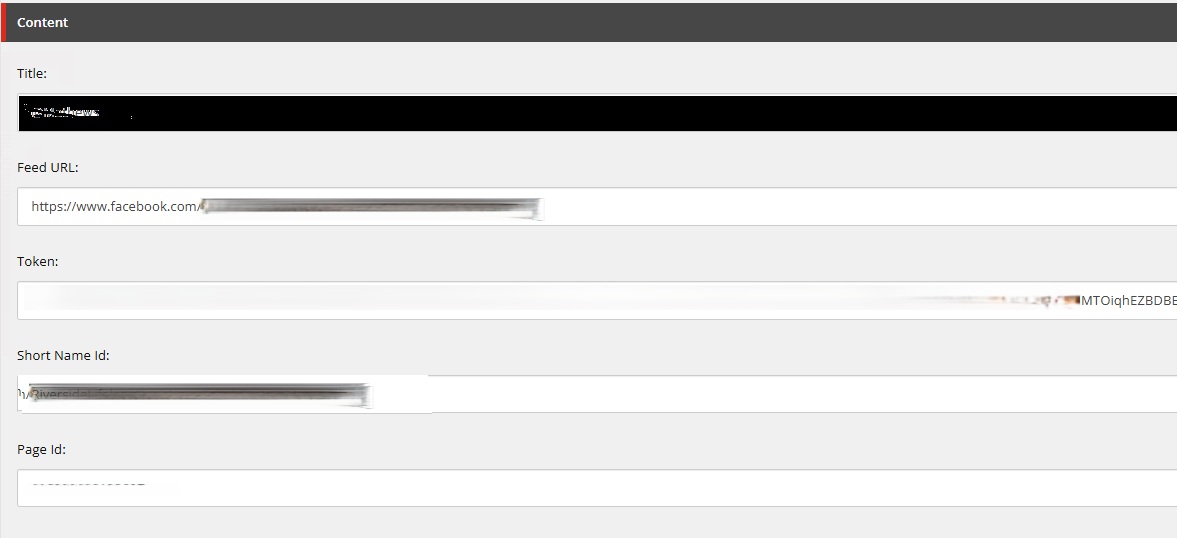
Facebook feed item(s) for multist:
Defining Strongly Typed Models
TypeScript interfaces provide strong typing for the GraphQL response.
The primary model contains:
Facebook feed configuration items
Title and subtitle fields
Total feeds to display
Each Facebook feed configuration item contains values such as:
Facebook Page ID
Access Token
Display Title
Strong typing improves IntelliSense, reduces runtime errors, and simplifies future maintenance.
interface MultilistField<T> {
  jsonValue: T[];
}
interface FacebookFeedItem {
  id: string;
  url: string;
  name: string;
  displayName: string;
  fields: {
    Title: Field<string>;
    FeedURL: Field<string>;
    Token: Field<string>;
    ShortNameId: Field<string>;
    PageId: Field<string>;
  };
}

export interface FacebookFeedsGqlData {
  facebookFeeds: MultilistField<FacebookFeedItem> | null;
  title: { jsonValue: Field<string> } | null;
  subTitle: { jsonValue: Field<string> } | null;
  totalSlidesToShow: { jsonValue: Field<string> } | null;
}

export type FacebookFeedsScProps = {
  fields: {
    data: {
      facebookFeedsData: FacebookFeedsGqlData | null;
    };
  };
};
Server Component Responsibilities
Instead of calling Facebook directly from the browser, the Sitecore wrapper component performs all data retrieval on the server.
Its responsibilities include:
Reading GraphQL datasource fields
Determining the number of posts to retrieve
Calling the internal Facebook API endpoint
Transforming Facebook responses into presentation models
Sorting posts chronologically
Passing the final dataset to the UI component
Because this work happens server-side, Facebook credentials remain protected and are never exposed to the client.
Supporting Multiple Facebook Pages
One interesting aspect of the implementation is its ability to aggregate posts from multiple Facebook pages.
Each selected Sitecore item contains:
Facebook Page ID
Access Token
Display Title
The component iterates through each configured page and invokes an internal API endpoint using parameters similar to:
with query parameters including:
pageId
Token
postsCount
The requests are executed concurrently using Promise.all(), improving performance when multiple pages are configured.
const results = await Promise.all(
        selectedFeeds.map(async (feed) => {
            // Fetch posts
         })
    );
Once all requests complete, the results are flattened into a single collection.
Aggregating and Sorting Posts
After retrieving posts from multiple Facebook pages, the component combines them into one list.
The posts are then sorted by creation date:
.sort((a, b) => Date.parse(b.postedTime) - Date.parse(a.postedTime))
Finally, only the configured number of posts is displayed.
This allows content authors to showcase the most recent posts across several Facebook pages instead of displaying each page independently.
Truncating Long Messages
Facebook post content can vary significantly in length.
To maintain a consistent card layout, messages exceeding a configurable limit are truncated.
The maximum message length is controlled using an environment variable, allowing adjustments without requiring a code deployment.
This ensures:
Consistent card heights
Better carousel alignment
Improved readability
Presentation Component
The presentation component is intentionally independent of Sitecore.
It simply accepts a collection of feed objects containing:
Post ID
Facebook URL
Message
Image
Posted date
Account title
Because the component receives already-transformed data, it remains reusable in Storybook, unit tests, or other applications.
Responsive Carousel with Swiper
Posts are rendered using the Swiper library.
The carousel provides:
Responsive breakpoints
Previous and Next navigation
Optional autoplay
Image
Touch support
Smooth transitions
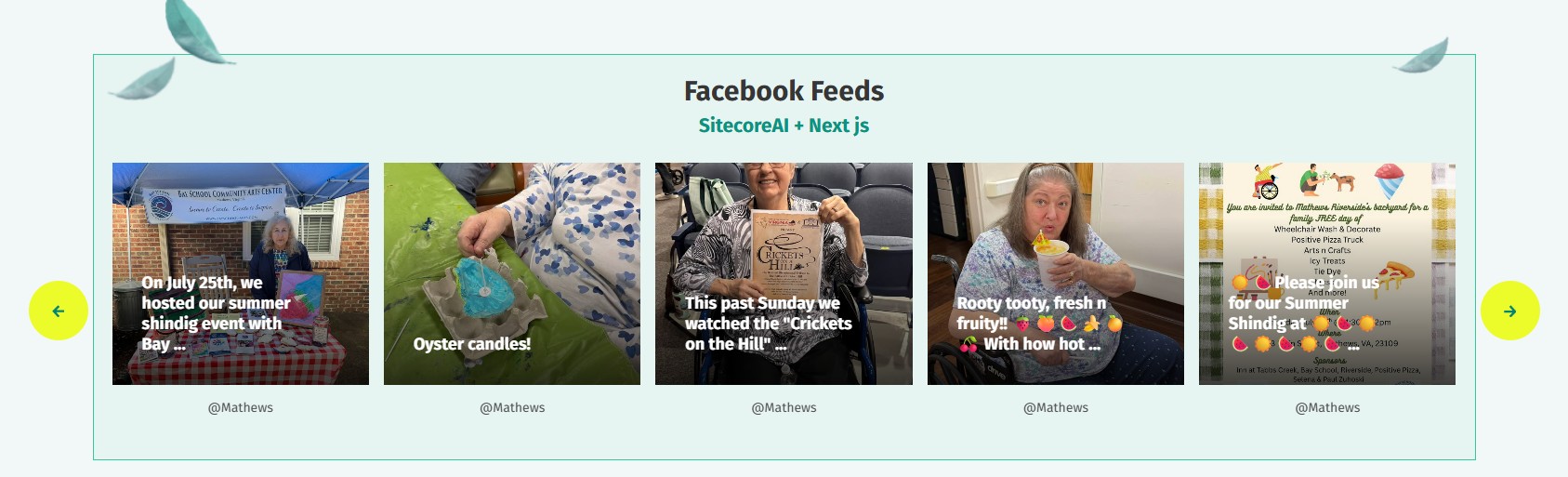
The layout automatically adjusts based on screen size:
Mobile – 1 card
Tablet – 3 cards
Desktop – 5 cards
This delivers an optimal browsing experience across devices.
Optional Facebook SDK
The presentation component includes optional loading of the Facebook JavaScript SDK.
This behavior is controlled through a property, making it easy to disable the SDK during:
Storybook development
Automated testing
Local component rendering
Avoiding unnecessary third-party scripts keeps development environments lightweight.
Optional Facebook SDK
The presentation component includes optional loading of the Facebook JavaScript SDK.
This behavior is controlled through a property, making it easy to disable the SDK during:
Storybook development
Automated testing
Local component rendering
Avoiding unnecessary third-party scripts keeps development environments lightweight.
Authoring Experience
From a content author's perspective, configuring the component is straightforward:
Create Facebook feed configuration items.
Enter the Facebook Page ID and Access Token.
Add one or more feed items to the datasource multilist.
Configure the section title and subtitle.
Specify the maximum number of posts to display.
Once published, the website automatically retrieves and displays the latest Facebook posts without requiring manual content updates.
Output:
Benefits of the Architecture
This implementation provides several advantages:
Separation of presentation and Sitecore integration
Secure server-side communication with Facebook APIs
Reusable React presentation component
Strongly typed GraphQL models
Support for multiple Facebook pages
Configurable display limits
Responsive user experience.
Easy content authoring within Sitecore XM Cloud
Conclusion:
This Facebook Feeds component demonstrates how Sitecore XM Cloud and Next.js can work together to build dynamic, content-driven experiences. By leveraging Sitecore GraphQL for content configuration, server-side data aggregation for secure Facebook integration, and a reusable React presentation layer, the solution delivers a scalable and maintainable social media experience.
The architecture follows modern composable principles by separating data retrieval, business logic, and presentation, resulting in a component that is both developer-friendly and content-author friendly.